
Background Checks
We recommend reading the Integration Plugin Overview first.
Overview
This documentation covers two components of the Integration Plugins Framework the createBackgroundCheck action workflow and the webhook processing mechanism.
Together, these enable a complete integration cycle where the platform sends candidates to external background check systems and receives status updates asynchronously.
Background Check Creation Flow
Registration
To register your plugin on your sandbox account, you need to send the Meta Endpoint URL to us via email ([email protected]).
If you don't have sandbox account we will create one for you.
For now all plugins are registered by the Pinpoint Integration Team - this is both for sandbox and live (client's) accounts (as we are still in Public Beta).
Lifecycle Overview
This flow shows the lifecycle for manual triggering. Background checks can also be triggered via Stage Actions (Automatic/Bulk Actions) or from Onboarding.
-
User initiates "Send to ExampleBackgroundChecks" action (where ExampleBackgroundChecks is the name of the background check provider/service defined by the plugin configuration)
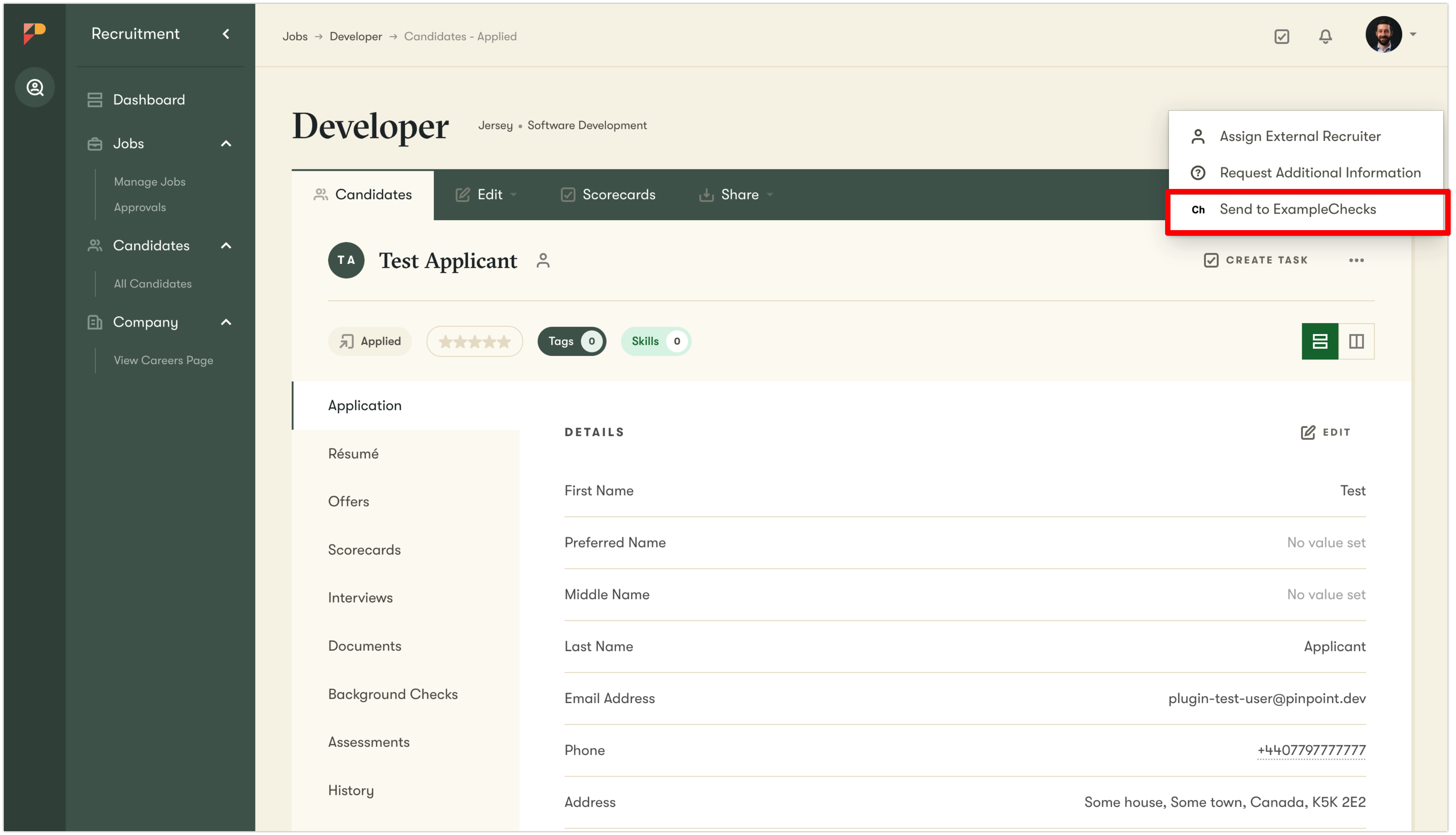
-
Pinpoint calls Action Meta Endpoint to build the form
-
User fills and submits the form (validation and error messages apply)
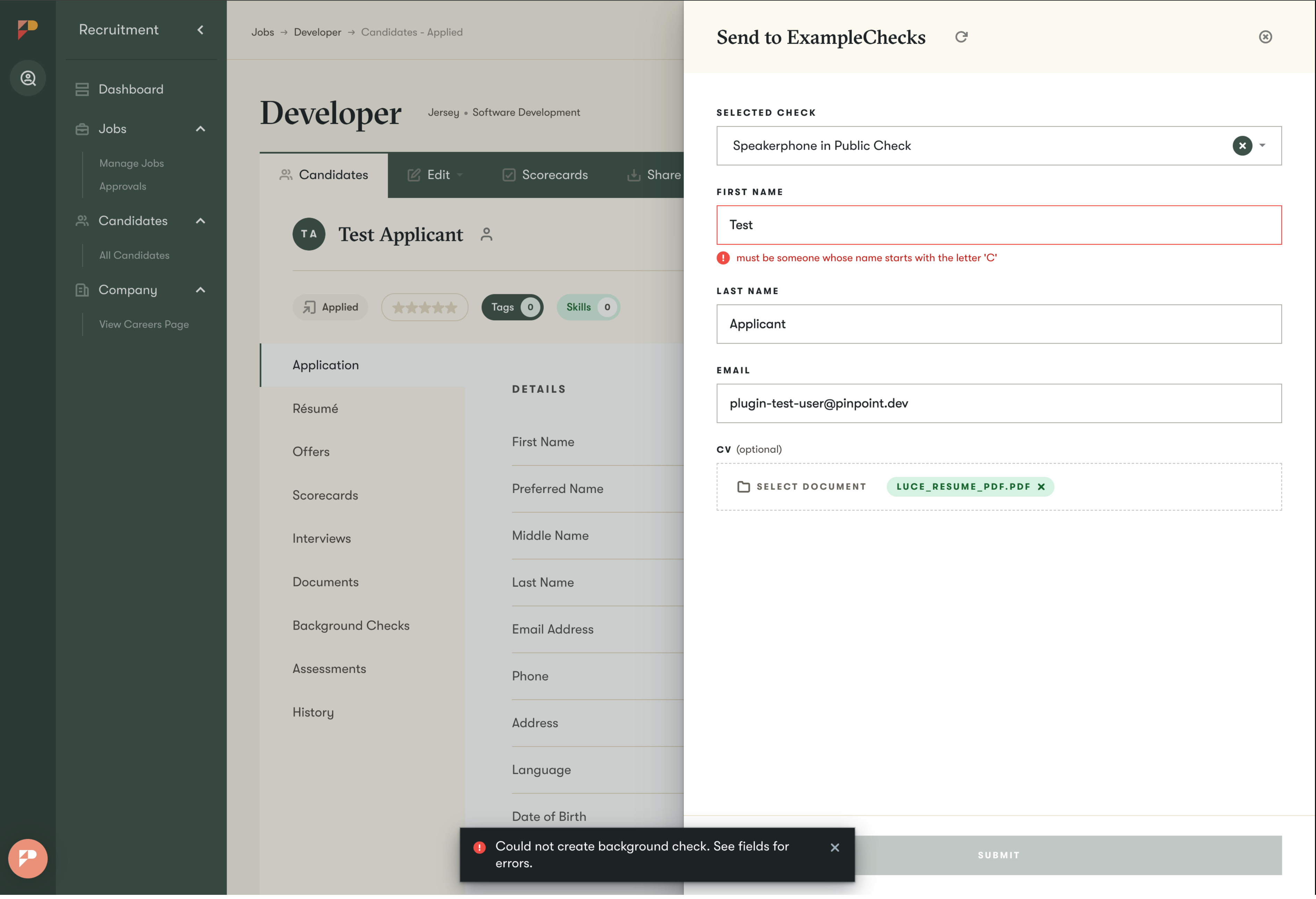
-
Platform calls Action Submit Endpoint to process
- The plugin calls the external system by passing the params from the form, webhook URL and redirect URL.
- External system (background check provider) processes the request
- If the request is correct,
- The plugin should send a successful response with ID of the background check from the external system.
- Pinpoint will then store the Background Check Record with ID of the background check from the external system and request details.
- External system initiates the background check for the candidate (typically by contacting the candidate via email)
- If the external system rejects the request (validation errors, 5xx)
- The plugin should return an error response
- Pinpoint shows the errors on the form and allows the user to correct errors and submit again (go back to point 3)
- If the request is correct,
-
Candidate completes the background check process
-
External system sends webhook back to Pinpoint platform (using the webhook URL provided by the plugin)
-
Pinpoint calls Webhook Process Endpoint to process (parse) the webhook payload
- Plugin extracts data from the webhook payload and responds with a structured payload to update the Background Check record
- Pinpoint updates the Background Check record and sends notifications about the completed background check (if requested by the plugin)
All requests Pinpoint makes to the plugin are
POSTrequests
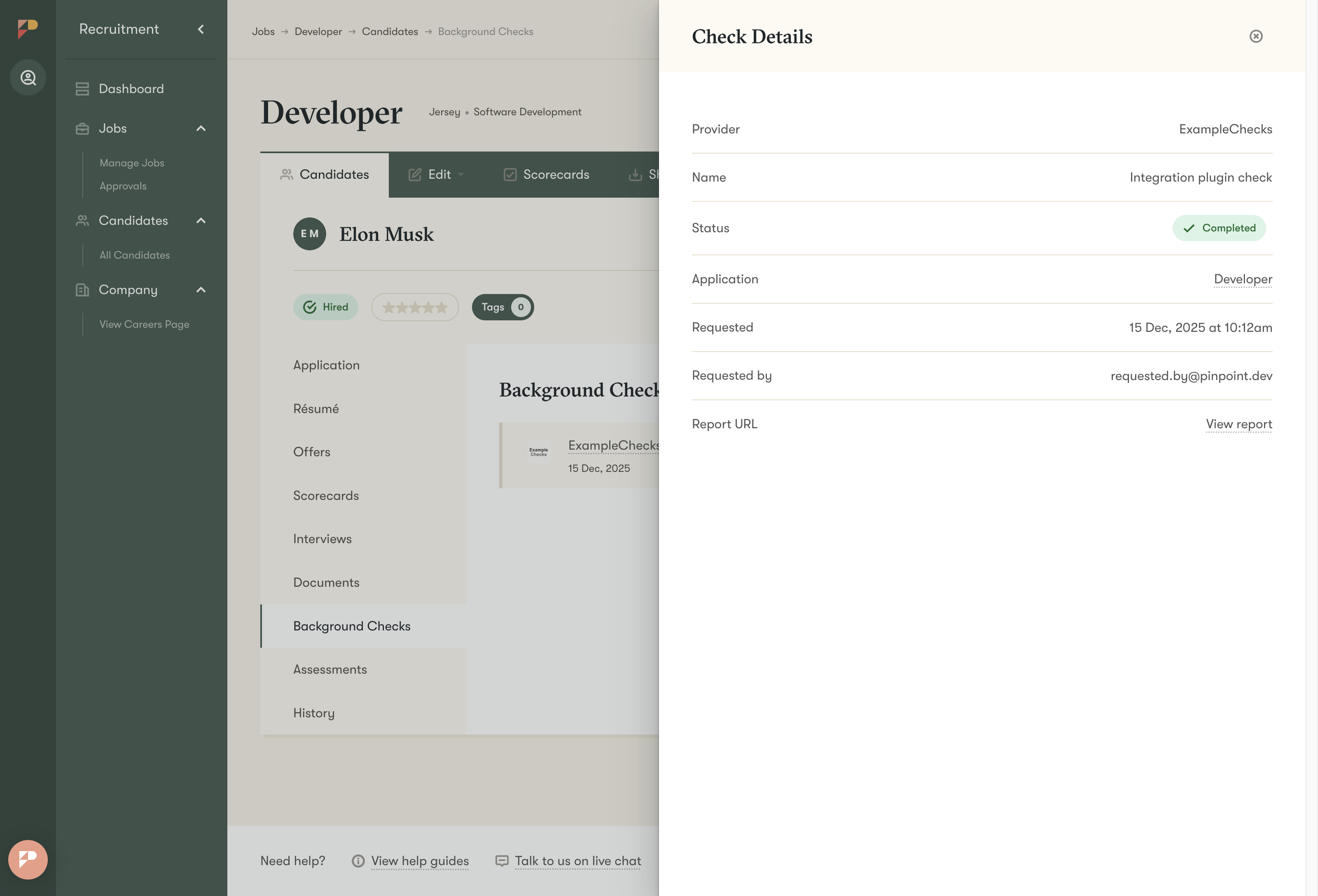
This is how a newly requested Background Check will be presented in Pinpoint UI:
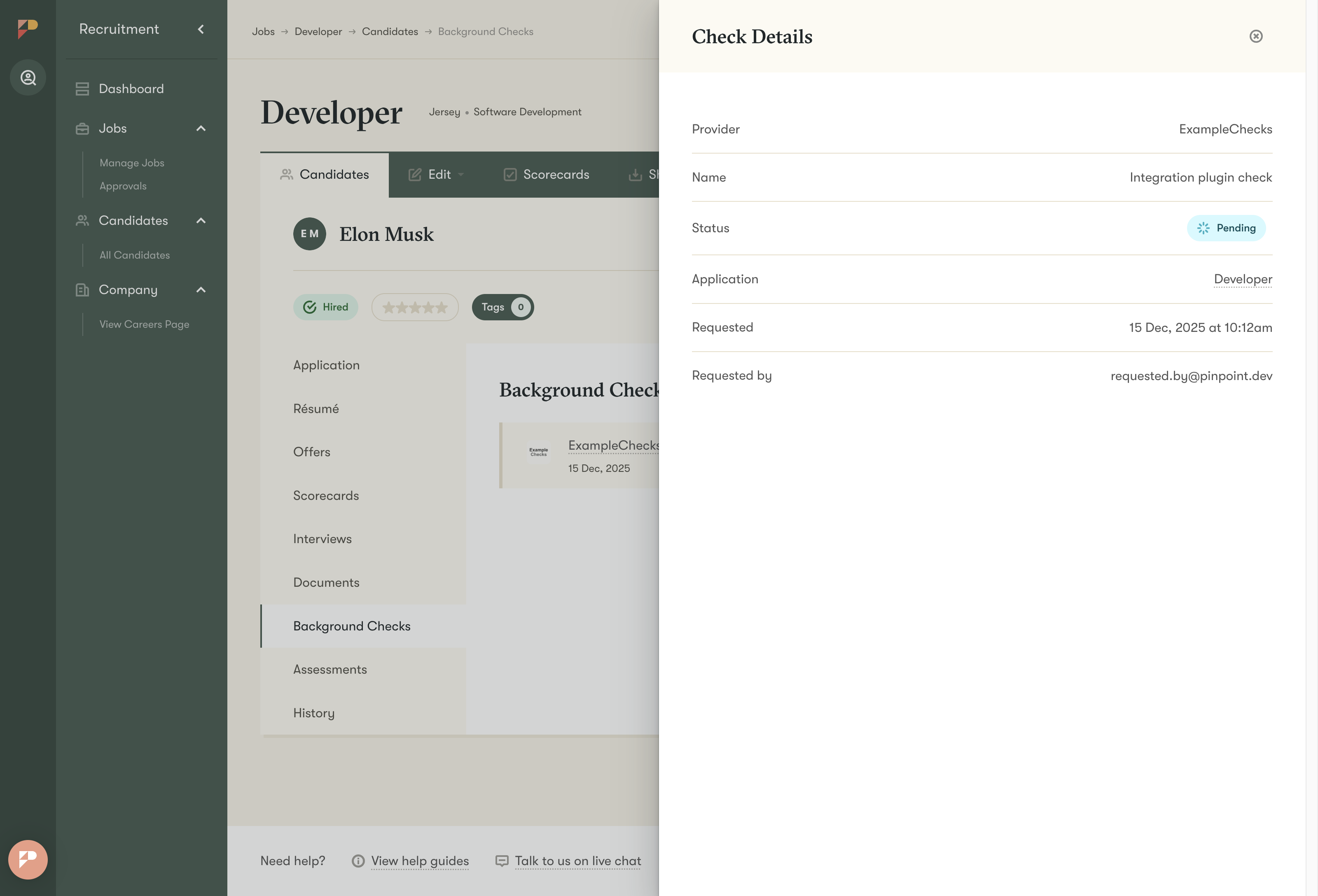
This is how a completed background check will be presented in Pinpoint UI:
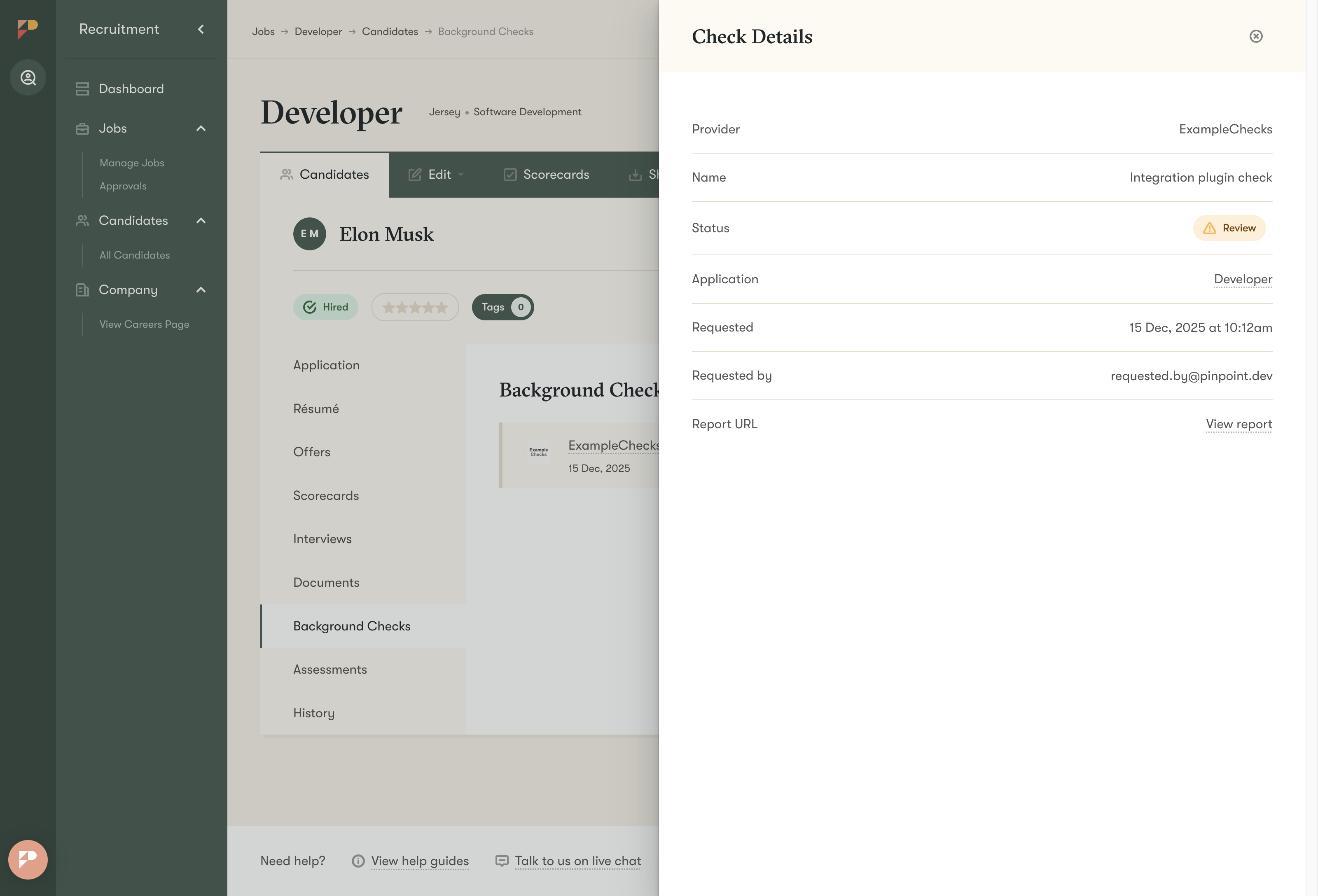
Example implementations
We find it most effective to learn by examining examples. Please find an example working implementation to get an idea of what is involved.
Example Express.js implementation
https://github.com/InfuseGroup/pinpoint_background_check_plugin_express_example
createBackgroundCheck Action
createBackgroundCheck ActionPurpose
The createBackgroundCheck action enables users to send candidate information to an external background check provider.
This creates a background check record in both the platform and the external system.
It also handles the webhook response from the external system, which updates the background check record in the platform.
Initial Set Up Endpoint (Meta Endpoint)
We currently don't support any authentication for the Meta Endpoint.
If you want to restrict access we recommend checking the domain (allow only frompinpointhq.com) or/and apply rate limiting.Alternative option is by sending a authentication token as a query parameter (you would provide the token to us directly).
We plan to introduce Basic auth soon.
Endpoint: Defined by your service (e.g. / ) - POST request
Called when: You initiate the setup of your plugin service. Pinpoint calls this endpoint when it registers the plugin in the system to get the name, logo and possible actions and configurations fields.
You can see it as a handshake between Pinpoint (Integration Plugins Framework) and the plugin.
Responsibilities:
- Create the integration in Pinpoint
- Fetch configuration fields
- Fetch form field data mappings
Response
Example Meta Response
{
  version: '2.0.0',
  name: 'ExampleBackgroundChecks',
  logoBase64: 'data:image/png;base64,{base64_data}',
  actions: [
    {
      actionType: 'createBackgroundCheck',
      key: 'createExampleBackgroundCheck',
      label: 'Send to ExampleBackgroundChecks',
      iconSvgBase64: 'data:image/svg+xml;base64,{base64_svg}',
      metaEndpoint: '/api/v1/partners/pinpoint/plugin/createBackgroundCheck/meta',
      mappings: [
        { key: 'firstName', label: 'First Name', value: '{{candidate_first_name}}' },
        { key: 'lastName', label: 'Last Name', value: '{{candidate_last_name}}' },
        { key: 'email', label: 'Email', value: '{{{candidate_email}}}' },
        { key: 'cvDocument', value: '{{candidate_cv}}' },
      ],
    },
  ],
  webhookProcessEndpoint: '/api/v1/partners/pinpoint/plugin/createBackgroundCheck/webhook',
  webhookAuthenticationHeader: 'X-Verify',
  configurationFormFields: [
    {
      key: 'apiKey',
      label: 'API Key',
      description: "Your API key for ExampleBackgroundChecks. The correct key is #{CORRECT_API_KEY}",
      type: 'string',
      required: true,
      sensitive: true,
      useAsHttpHeader: 'X_EXAMPLE_BACKGROUND_CHECKS_KEY',
      placeholder: 'For example: uogKYdo4Foufve82P_*Mrpm7uu-bY2AwG7ur.usf',
    },
    {
      key: 'apiBaseUrl',
      label: 'Base URL',
      description:
      'Your Base URL for ExampleBackgroundChecks. Use `http://localhost:14568` if running local server.',
      type: 'string',
      required: true,
      sensitive: false,
      useAsHttpHeader: 'X_EXAMPLE_BASE_URL',
      placeholder: 'For example: http://localhost:14568',
    },
  ],
}
Meta response schema
| Field | Type | Required | Validation | Description |
|---|---|---|---|---|
version | string | Yes | Must be '2.0.0' | API version of the plugin interface |
name | string | Yes | Non-empty | Display name of the integration provider |
logoBase64 | string | Yes | Non-empty | Base64-encoded logo image with data URI prefix (e.g., data:image/png;base64,{base64_png}) |
actions | array | Yes | See Action Object Schema | List of action definitions supported by this integration. Typically just one action. For Background Checks, it will be createBackgroundCheck |
listEndpoints | array | Optional | See List Endpoint Object Schema | Endpoints that return dynamic lists of options (for picklists/dropdowns/selects). |
configurationFormFields | array | Optional | See Configuration Form Field Schema | Configuration form field definitions for plugin setup. Those will be displayed for the admin users in Pinpoint to configure the integration (e.g. API Key, Base URL, Default deadline days) |
webhookProcessEndpoint | string | Optional | Relative endpoint path for processing webhooks (e.g., '/webhook/process') When your main meta endpoint is https://domain.com/api/v1/partners/pinpoint/plugin, then the Plugin Framework will treat the host (https://domain.com) as a base URL. It means that all of the endpoints in the meta responses need to have a full path from the base URL. If your full endpoint for the webhook is https://domain.com/api/v1/partners/pinpoint/plugin/webhook, then | |
webhookAuthenticationHeader | string | Optional | HTTP header name for webhook authentication (e.g., 'X-Verify-Token') | |
errorEndpoint | string | Optional | Relative endpoint for error handling/reporting |
Action Object Schema
| Field | Type | Required | Validation | Description |
|---|---|---|---|---|
actionType | string(enum) | Yes | Must be a valid ActionKey (createBackgroundCheck) | Defines the type of the action |
key | string | Yes | Unique action key | Must be unique across all actions (e.g createExampleBackgroundCheck) |
label | string | Yes | Non-empty | Display label for the action in UI (e.g. Send to ExampleBackgroundChecks) |
iconSvgBase64 | string | Yes | Non-empty | Base64-encoded SVG icon for the action (displayed next to the label) e.g. |
metaEndpoint | string | Yes | Non-empty | Relative endpoint to fetch action-specific form fields. Called by the framework to render the form in the UI (after clicking the action button). When your main meta endpoint is https://domain.com/api/v1/partners/pinpoint/plugin, then the Plugin Framework will treat the host (https://domain.com) as a base URL. It means that all of the endpoints in the meta responses need to have a full path from the base URL. If your full endpoint for the action meta is https://domain.com/api/v1/partners/pinpoint/plugin/createBackgroundCheck/meta, then |
mappings | array | Optional | See Mapping Object Schema | Default field mappings for this action |
Configuration Form Fields Schema
| Field | Type | Required | Validation | Description |
|---|---|---|---|---|
key | string | Yes | Non-empty | Unique identifier for the configuration field |
label | string | Yes | Non-empty | Display label for the field |
type | string | Yes | One of: string, persisted_string | Field type (persisted_string maintains value across actions) |
actionKey | string | Optional | Must be valid ActionKey | Associates this config field with a specific action (when not provided, it will be sent to all actions) |
defaultValue | string | Optional | Default value for the field | |
multiline | boolean | Optional | Whether to render as textarea | |
placeholder | string | Optional | Placeholder text for the input | |
description | string | Optional | Help text explaining the field | |
required | boolean | Optional | Whether this field must be filled | |
readonly | boolean | Optional | Whether the field is read-only | |
sensitive | boolean | Optional | Whether this field contains sensitive data (encrypted and masked). Set to true for any fields storing credentials. | |
useAsHttpHeader | string | Optional | Non-empty | HTTP header name to include this value in requests (e.g., 'X-API-Key'). When set, the framework will add an HTTP header with the configured value when sending requests to all plugin endpoints. |
singleSelectOptions | array | Optional | See Select Option Object | Options for single-select dropdown |
multiSelectOptions | array | Optional | See Select Option Object | Options for multi-select dropdown |
checkboxOptions | array | Optional | See Select Option Object | Options for checkbox group |
radioOptions | array | Optional | Max 3 options, See Select Option Object | Options for radio button group |
Mapping Object Schema
| Field | Type | Required | Description |
|---|---|---|---|
key | string | Yes | Field identifier that references a form field |
value | string | Yes | Default value or template variable (e.g., {{candidate_email}}).Please find the list of possible values in a separate section. |
label | string | Optional | Display label for the field |
multiline | boolean | Optional | Whether this is a multiline text field |
List Endpoint Object Schema
| Field | Type | Required | Description |
|---|---|---|---|
key | string | Yes | Unique identifier for the list endpoint (e.g. locations) |
label | string | Yes | Display label for the list |
endpoint | string | Yes | Relative endpoint path to fetch the list (e.g./lists/locations) |
Action Meta Endpoint
Endpoint: Defined in the meta response (at actions.[].metaEndpoint, e.g. /createBackgroundCheck/meta) - POST request
Called when: User clicks the action button in the UI (e.g. Send to ExampleBackgroundChecks)
Responsibilities:
- Validate plugin configuration
- Fetch dynamic options from external API (e.g., available background check packages)
- Build and return the form fields
Dynamic form refetching
The Plugin Framework supports form re-rendering based on the value selected by the user. Please find more information here
Request payload
Request Payload Example
{
  payloadVersion: "1.0.0",
  key: "createBackgroundCheck",
  configurationValues: [
    { key: 'apiKey', value: 'aef98an3o9ran9oesd' }
  ],
  formFields: [
    { key: 'selectedPackage', value: 'standard-background-check' },
    { key: 'firstName', value: 'Example' },
    { key: 'email', value: '[email protected]' }
  ],
}
Request Payload Schema
| Field | Type | Required | Validation | Description |
|---|---|---|---|---|
payloadVersion | string | Yes | Must be '1.0.0' | Version of the payload schema |
key | string | Yes | Must be 'createBackgroundCheck' | Action identifier |
configurationValues | array | Optional | See Configuration Value Object | Current configuration values |
formFields | array | Optional | See Form Field Value Object | Current form field values (only present during refetch, includes fields marked with includeValueInRefetch: true) |
Response
Response Example
Return a form with all necessary fields:
{
  actionVersion: '1.0.0',
  key: 'createBackgroundCheck',
  label: 'Send to ExampleBackgroundChecks',
  description: 'Sends a candidate to the internal ExampleBackgroundChecks system',
  formFields: [
    {
      key: 'selectedPackage',
      label: 'Background Check Package',
      placeholder: 'Select package...',
      type: 'string',
      required: true,
      value: '',
      singleSelectOptions: options
    },
    {
      key: 'firstName',
      label: 'First Name',
      type: 'string',
      required: true,
      readonly: false,
    },
    {
      key: 'lastName',
      label: 'Last Name',
      type: 'string',
      required: true,
      readonly: false
    },
    {
      key: 'email',
      label: 'Email',
      type: 'string',
      required: true,
      readonly: false
    },
    {
      key: 'cvDocument',
      label: 'CV',
      type: 'file',
      required: false,
      readonly: false
    }
  ],
  submitEndpoint: '/api/v1/partners/pinpoint/plugin/createBackgroundCheck/submit'
}
Response Schema
| Field | Type | Required | Validation | Description |
|---|---|---|---|---|
actionVersion | string | Yes | Must be 1.0.0 | Version of the action schema |
key | string | Yes | Must be createBackgroundCheck | Action identifier |
label | string | Yes | Non-empty | Display label for the action (e.g. Send to ExampleBackgroundChecks) |
description | string | Yes | Non-empty | Description of what this action does |
formFields | array | Yes | See Form Fields Schema | Form fields to display to the user |
submitEndpoint | string | Yes | Non-empty | Endpoint to submit the form data to When your main meta endpoint is https://domain.com/api/v1/partners/pinpoint/plugin, then the Plugin Framework will treat the host (https://domain.com) as a base URL. It means that all of the endpoints in the meta responses need to have a full path from the base URL. If your full endpoint for the submit action is https://domain.com/api/v1/partners/pinpoint/plugin/createBackgroundCheck/submit, then |
Form Fields Schema
| Field | Type | Required | Validation | Description |
|---|---|---|---|---|
key | string | Yes | Non-empty | Unique identifier for the field (e.g. email, first_name) |
label | string | Yes | Non-empty | Display label for the field |
type | string | Yes | One of:string,callout,heading,date,divider,file,files | Type of form field to render NOTE: Select/dropdown fields are of the string type, but requires specifying singleSelectOptions or multiSelectOptions (or their ListKey variations). Radio/checkbox and numbers are also of a string type. |
value | string | Optional | Default or pre-filled value | |
placeholder | string | Optional | Placeholder text for input fields | |
description | string | Optional | Help text displayed below the field | |
multiline | boolean | Optional | Whether to render as a textarea | |
required | boolean | Optional | Whether the field must be filled | |
readonly | boolean | Optional | Whether the field is read-only | |
hidden | boolean | Optional | Whether the field is hidden from view | |
intent | string | Optional | One of: none, primary, success, warning, danger | Visual intent for callout fields |
acceptedFileTypes | array | Optional | Array of: doc, docx, gif, jpeg, jpg, pdf, png, pptx, svg, xls, xlsx | Accepted file types for file/files fields |
includeValueInRefetch | boolean | Optional | Include this field's value when refetching the form. This is useful when you want to re-render the form based on a selected value for this field. | |
performRefetchOnChange | boolean | Optional | Refetch the form when this field changes. This is useful when you want to re-render the form based on a selected value for this field. (e.g. when the user selects the location, you want to load a list of options for the departments field). | |
singleSelectOptions | array | Optional | See Select Option Object | Options for single-select dropdown |
singleSelectOptionsListKey | string | Optional | Reference to a listEndpoint key for dynamic options. Must be a key of one of the endpoints defined in the listEndpoints array (of the meta response) | |
multiSelectOptions | array | Optional | See Select Option Object | Options for multi-select dropdown |
multiSelectOptionsListKey | string | Optional | Same as for singleSelectOptionsListKey | |
checkboxOptions | array | Optional | See Select Option Object | Options for checkbox group |
radioOptions | array | Optional | Max 3 options, See Select Option Object | Options for radio button group |
Select Option Object Schema
| Field | Type | Required | Description |
|---|---|---|---|
label | string | Yes | Display text for the option |
value | string | Yes | Value to submit when this option is selected |
Action Submit Endpoint
Endpoint: Defined in meta response (via submitEndpoint, e.g. /createBackgroundCheck/submit) - POST request
Called when: User submits the form
Responsibilities:
- Validate configuration and field values
- Send background check creation/invite request to external system
- Return success/error feedback
Payload
The platform sends several key pieces of data in the payload that can be used to facilitate some specific flows with third parties. Key fields are:
formFields- Form field values submitted by the user - use this to generate payload for background check creation in the background check providerconfigurationValues- Current configuration values from plugin setup (e.g. credentials)generatedUuid- Unique identifier for this background check instance - this is different for every requestgeneratedUuidRedirectUrl- URL that leads to the Application page in Pinpoint Admin UI (to be shared with external system if needed) - this is different for every requestwebhookUrl- URL where an external system should send status updates to (status change, background check completion, etc) - this is the same for every request. If your third party requests specific webhook URLs for each record, you can build a specific URL in your provider adding thegeneratedUuidin the query parameters.
Example payload
{
  payloadVersion: '1.0.0',
  key: 'createBackgroundCheck',
  formFields: [
    { key: 'selectedPackage', value: 'standard-background-check' },
    { key: 'firstName', value: 'Example' },
    { key: 'email', value: '[email protected]' }
  ],
  configurationValues: [
    { key: 'cvDocument', value: 'https://example.com/cv.pdf' }
  ],
  generatedUuid: 'f81d4fae-7dec-11d0-a765-00a0c91e6bf6',
  webhookUrl: 'https://app.pinpointhq.xyz/integration_plugins/webhooks/events/1ad84ce0-0e6f-4366-b939-834d63b8faf1',
  generatedUuidRedirectUrl: 'https://app.pinpointhq.xyz/integration_plugins/background_checks/redirect/f81d4fae-7dec-11d0-a765-00a0c91e6bf6'
}
Example Successful Response
{
  resultVersion: '2.0.0',
  key: 'createBackgroundCheck',
  success: true,
  backgroundCheckName: 'Standard Background Check',
  status: 'pending',
  externalIdentifier: 'external-uuid-456',
  externalRecordUrl: 'https://api.example.com/api/external-uuid-456',
  message: {
    title: 'Background check successfully initiated',
    text: 'The background check has been initiated and the candidate will receive an email with instructions.',
    status: 'success'
  }
}
Example Error Response
{
  resultVersion: '2.0.0',
  key: 'createBackgroundCheck',
  success: false,
  toast: {
    error: 'Failed to send background check request to the candidate'
  },
  errors: {
    email: 'Email is invalid',
    firstName: 'First name is required'
  }
}
Request Payload Schema
When the user submits the form, Pinpoint sends a POST request to your submit endpoint with the following payload structure:
| Field | Type | Required | Validation | Description |
|---|---|---|---|---|
payloadVersion | string | Yes | Must be '1.0.0' | Version of the payload schema |
key | string | Yes | Must be 'createBackgroundCheck' | Action identifier |
formFields | array | Yes | See Form Field Value Object | User-submitted form field values |
configurationValues | array | Optional | See Configuration Value Object | Current configuration values from plugin setup |
webhookUrl | string | Optional | Non-empty | URL for the provider to send webhooks to |
generatedUuid | string | Optional | Non-empty | UUID generated by Pinpoint for tracking this background check instance |
generatedUuidRedirectUrl | string | Optional | Non-empty | URL to redirect candidates to after background check completion |
Form Field Value Object
| Field | Type | Required | Description |
|---|---|---|---|
key | string | Yes | Field identifier (matches the key from formFields in meta response) |
value | string | Optional | User-submitted value (null for empty fields) |
Configuration Value Object
| Field | Type | Required | Description |
|---|---|---|---|
key | string | Yes | Configuration field key (from configurationFormFields) |
value | string | Optional | Configuration value (nullable) |
Response Schema
Your endpoint must return a response following this schema:
Success Response
| Field | Type | Required | Validation | Description |
|---|---|---|---|---|
resultVersion | string | Yes | Must be '2.0.0' | Version of the result schema |
key | string | Yes | Must be 'createBackgroundCheck' | Action identifier |
success | boolean | Yes | Must be true | Indicates successful background check creation |
backgroundCheckName | string | Yes | Non-empty | Name of the background check (displayed in Pinpoint UI) |
externalIdentifier | string | Yes | Non-empty | ID of the background check in the external system (used to match webhook updates) |
status | string | Optional | Valid background check status | Current status of the background check (e.g., pending, in_progress, completed) |
complete | boolean | Optional | Nullable | Whether the background check has been fully completed |
externalSystem | string | Optional | Non-empty | Name of the external background check system |
externalRecordUrl | string | Optional | Non-empty | URL to view the background check in the external system |
externalLinks | array | Optional | See External Link Object Schema | Additional links related to the background check |
message | object | Optional | See Message Object Schema | Success or informational message displayed to the user |
toast | object | Optional | See Toast Object Schema | Toast notifications to display in the UI |
persist | array | Optional | See Persist Object Schema | Configuration values to persist for future use |
Error Response
If validation fails or the external system rejects the request, return:
| Field | Type | Required | Validation | Description |
|---|---|---|---|---|
success | boolean | Yes | Must be false | Indicates failure |
toast | object | Optional | See Toast Object Schema | Toast notifications to display |
errors | array | Optional | See Field Error Object Schema | Field-specific validation errors |
Message Object Schema
| Field | Type | Required | Description |
|---|---|---|---|
text | string | Yes | Message body text |
title | string | Optional | Message title |
status | string | Optional | One of: pending, success, error — controls the visual styling |
Toast Object Schema
| Field | Type | Required | Description |
|---|---|---|---|
error | string | Optional | Error message to display |
warning | string | Optional | Warning message to display |
info | string | Optional | Informational message to display |
success | string | Optional | Success message to display |
Field Error Object Schema
| Field | Type | Required | Description |
|---|---|---|---|
key | string | Yes | Field identifier that has the error |
error | string | Yes | Error message for the field |
Persist Object Schema
The persist array allows storing values back to the plugin configuration. These values become available in subsequent API calls through configurationValues in the payload.
It is a way to update a plugin configuration field(s) based on the response of an external system.
| Field | Type | Required | Description |
|---|---|---|---|
key | string | Yes | Configuration field key to update |
value | string | Yes | New value to persist (will be available in configurationValues on future requests) |
External Link Object Schema
| Field | Type | Required | Description |
|---|---|---|---|
key | string | Yes | Unique identifier for the link |
label | string | Yes | Display text for the link button |
url | string | Yes | URL to navigate to when clicked |
Webhook Processing
Purpose
Webhooks enable external background check systems to push status updates back to the platform asynchronously.
This eliminates the need for polling and provides real-time updates.
The flow looks like this:
- External system sends a POST request to the
webhookUrl(which was sent in the payload to the submit endpoint and plugin sent it to the external system). - Plugins Framework receives the webhook, finds the plugin instance based on the ID in the
webhookUrlresponds with 200 OK and schedules the background job to process the webhook payload. - The framework's background job does the following:
- Sends a webhook request (with the original payload from the external system) to the plugin's
webhookProcessEndpoint(defined in main meta response). - Plugin processes the webhook payload and returns a structured response, which the framework uses to update the background check record in the platform.
- The framework updates the background check record in the platform with the parameters returned by the plugin and sends notifications to Pinpoint users (if requested).
- Sends a webhook request (with the original payload from the external system) to the plugin's
Webhook Configuration
Define the webhook process endpoint in the meta response via webhookProcessEndpoint field.
Webhook Process Endpoint
Endpoint: Defined in meta response (webhookProcessEndpoint) (e.g., /webhook/process) - POST request
Called when: External system POSTs to the platform's webhook URL
Responsibilities:
- Parse webhook payload
- Extract background check updates
- Return structured update instructions
Payload
Example request payload
{
  "body": "{\"status\":\"completed\", \"id\":\"external-uuid-123\", \"checkName\":\"Standard Background Check\"}",
  "headers": {
    "Content-Type": "application/json"
  },
  "configurationValues": [
    {
      "key": "apiKey",
      "value": "apwu498roa9wejrfahow4u"
    }
  ]
}
Request Payload Schema
When an external system sends a webhook to Pinpoint, the platform forwards the request to your webhook process endpoint with this payload:
| Field | Type | Required | Description |
|---|---|---|---|
body | string | Yes | The raw body of the webhook request from the external system (typically JSON stringified, but can also be XML) |
headers | object | Optional | HTTP headers from the original webhook request |
configurationValues | array | Optional | Current configuration values (same structure as in submit endpoint) |
The
bodyfield contains the raw webhook payload as a string. You'll need to parse it (e.g.,JSON.parse(payload['body'])) to extract the data from your external background check system.
Response
Example successful response
{
  success: true,
  updateBackgroundChecks: [
    {
      externalIdentifier: 'external-uuid-456',
      status: 'completed',
      complete: true,
      result: "clear",
      resultUrl: 'https://example.com/reports/...',
      resultData: [
        {
          key: 'criminal_check_result',
          label: 'Criminal Check Result',
          value: 'No records found'
        },
        {
          key: 'identity_check_result',
          label: 'Identity Check Result',
          value: 'Verified'
        }
      ],
      shouldNotify: true,
      externalLinks: [
        {
          key: 'report',
          label: 'See Candidate in ExampleBackgroundChecks',
          url: 'https://example.com/candidates/external-uuid-456'
        }
      ]
    }
  ]
}
Response Schema
Your webhook process endpoint must return a response following this schema:
| Field | Type | Required | Validation | Description |
|---|---|---|---|---|
resultVersion | string | Yes | Must be '1.0.0' | Version of the result schema |
success | boolean | Yes | Must be true | Whether the webhook processing succeeded |
updateBackgroundChecks | array | Optional | See Update Background Check Object Schema | List of background check updates to apply |
Update Background Check Object Schema
Each object in the updateBackgroundChecks array should follow this structure:
Why this is an Array? Although webhooks typically update a single background check, the array structure allows for batch updates in future implementations and provides consistency with other update patterns.
| Field | Type | Required | Validation | Description |
|---|---|---|---|---|
externalIdentifier | string | Yes* | Non-empty | ID of the background check in the external system (must match the externalIdentifier returned from submit endpoint). Either externalIdentifier or uuid must be present. |
uuid | string | Yes* | Non-empty | The generatedUuid from the original submit payload. Either externalIdentifier or uuid must be present. |
status | string(enum) | Optional | Valid background check status | New status for the background check. See Status Values below. |
complete | boolean | Optional | Nullable | Whether the background check has been fully completed |
result | string | Optional | Nullable | Background check overall result (e.g. clear, consider, adverse_action) |
resultUrl | string | Optional | Nullable | URL to the result/report (can be a PDF or a website) |
resultData | array of objects | Optional | See Result Data Object Schema | Additional result data (e.g. result breakdown by check type) |
externalLinks | array | Optional | See External Link Object Schema | Links to other resources related to the background check or candidate profile in the external system (on top of resultUrl) |
shouldNotify | boolean | Optional | Nullable | Whether to send notifications about this update (set to true to trigger email notifications to the hiring team). Notification should only be sent once when the background check is completed, so set it to true only if the status is completed and you don't expect more webhooks for a given background check. |
Status Values
The status field in the update object accepts the following values:
| Status | Description |
|---|---|
pending | Background check has been initiated but not yet started |
in_progress | Background check is currently being processed |
completed | Background check has been completed |
received | Request has been received by the provider |
invited | Candidate has been invited to submit information |
sent | Background check request has been sent |
engaged | Candidate has engaged with the process |
awaiting_applicant_submission | Waiting for candidate to submit required information |
submitted_to_source | Information submitted to source for verification |
client_action_required | Action required from the Pinpoint user |
applicant_action_required | Action required from the candidate |
pending_quality_review | Pending quality review |
in_quality_review | Currently under quality review |
pending_adjudication | Pending adjudication decision |
pending_fulfillment | Pending fulfillment |
ready_for_review | Ready for review by the hiring team |
under_review | Currently under review |
analyzing | Results are being analyzed |
consider | Results require consideration |
clear | Background check came back clear |
review | Results flagged for review |
partial | Partial results received |
no_result | No result available |
pre_adverse_action | Pre-adverse action notice issued |
adverse_action | Adverse action taken |
disputed | Results have been disputed |
in_dispute | Currently in dispute |
not_eligible | Candidate is not eligible |
returned | Check has been returned |
hold | Check is on hold |
suspended | Check has been suspended |
canceled | Background check was cancelled |
expired | Background check has expired |
error | An error occurred during the check |
draft | Draft state |
archive | Archived |
upgrade | Upgrade required |
passed | Background check passed |
deal_broken | Deal broken |
deleted | Record has been deleted |
ongoing | Check is ongoing |
superseded | Superseded by a newer check |
External Link Object Schema
| Field | Type | Required | Description |
|---|---|---|---|
key | string | Yes | Unique identifier for the link |
label | string | Yes | Display text for the link button |
url | string | Yes | URL to navigate to when clicked |
Result Data Object Schema
| Field | Type | Required | Description |
|---|---|---|---|
key | string | Yes | Unique identifier for the datapoint |
label | string | Yes | Display text that describes the value (e.g. "Criminal Record Check Result") |
value | string | Yes | Value of the result datapoint (e.g. "No records found") |
Example of the webhook process logic
def self.webhook_process(payload:, headers: nil)
  api_base_url = headers&.dig(API_BASE_URL_HEADER)
  parsed_body = JSON.parse(payload['body'])

  # Extract background check data
  external_guid = parsed_body['id']
  status = ALLOWED_STATUSES.include?(parsed_body['status']) ? parsed_body['status'] : 'pending'
  result = parsed_body['result']
  report_path = parsed_body['report_path']
  report_url = "#{api_base_url}/#{report_path}"

  # Build background check update
  background_check_update = {
    externalIdentifier: external_guid,  # Matches externalIdentifier from submit
    result: result,
    status: status,
    complete: true,
    shouldNotify: true,  # Trigger platform notifications
    resultUrl: report_url,
    externalLinks: [
      {
        key: 'candidate_url',
        label: 'Candidate Profile',
        url: "https://example.com/candidate/#{external_guid}"
      }
    ]
  }

  # Return array of updates (can update multiple background checks)
  {
    resultVersion: '1.0.0',
    success: true,
    updateBackgroundChecks: [background_check_update]
  }
end
Complete Integration Flow Example
Note: This is a simplified example of the complete flow (payloads are not complete).
1. User Sends Candidate to Background Check
Platform → Plugin (Action Meta Endpoint)
POST /createBackgroundCheck/metaPlugin → Platform
{
  formFields: [
    { key: 'selectedPackage', type: 'string', singleSelectOptions: [...] },
    { key: 'firstName', type: 'string', value: 'John' },
    { key: 'email', type: 'string', value: '[email protected]' }
  ],
  submitEndpoint: '/createBackgroundCheck/submit'
}
2. User Submits Form
Platform → Plugin (Submit Endpoint)
POST /createBackgroundCheck/submit
{
  formFields: [
    { key: 'selectedPackage', value: 'standard-background-check' },
    { key: 'firstName', value: 'Example' },
    { key: 'email', value: '[email protected]' }
  ],
  generatedUuid: 'f81d4fae-7dec-11d0-a765-00a0c91e6bf6',
  webhookUrl: 'https://app.pinpointhq.xyz/integration_plugins/webhooks/events/1ad84ce0-0e6f-4366-b939-834d63b8faf1',
  generatedUuidRedirectUrl: 'https://app.pinpointhq.xyz/integration_plugins/background_checks/redirect/f81d4fae-7dec-11d0-a765-00a0c91e6bf6'
}
3. Plugin Creates Background Check
Plugin → External Background Check System
POST https://api.example.com/api/background-checks
{
  package: 'standard-background-check',
  email: '[email protected]',
  webhook_url: 'https://app.pinpointhq.xyz/integration_plugins/webhooks/events/1ad84ce0-0e6f-4366-b939-834d63b8faf1?uuid=f81d4fae-7dec-11d0-a765-00a0c91e6bf6',
  platform_url: 'https://app.pinpointhq.xyz/integration_plugins/background_checks/redirect/f81d4fae-7dec-11d0-a765-00a0c91e6bf6',
  uuid: 'f81d4fae-7dec-11d0-a765-00a0c91e6bf6'
}
External System → Plugin
{
  id: 'external-uuid-456',
  status: 'pending',
  description: 'Standard Background Check'
}
If the plugin in implemented as part of the external system codebases, there might be an internal code call instead of HTTP.
4. Plugin Returns Success (or Error) Response
Plugin → Platform
{
  resultVersion: '2.0.0',
  key: 'createBackgroundCheck',
  success: true,
  backgroundCheckName: 'Standard Background Check',
  status: 'pending',
  externalIdentifier: 'external-uuid-456',
  externalRecordUrl: 'https://api.example.com/api/external-uuid-456',
  message: {
    title: 'Background check successfully initiated',
    text: 'The background check has been initiated...',
    status: 'success'
  }
}
5. Candidate Completes Background Check
External System → Platform (Webhook)
POST https://app.pinpointhq.xyz/integration_plugins/webhooks/events/1ad84ce0-0e6f-4366-b939-834d63b8faf1
{
  id: 'external-uuid-456',
  status: 'completed',
  result: 'clear',
  report_path: 'reports/external-uuid-456'
}
6. Platform Processes Webhook
Pinpoint passes back the payload it receives at the webhook endpoint to the provider to carry out any custom logic and return a result to complete the background check update
Platform → Plugin (Webhook Process)
POST /webhook
{
  body: '{"id":"external-uuid-456","status":"completed",...}'
}
Plugin → Platform
{
  success: true,
  updateBackgroundChecks: [
    {
      externalIdentifier: 'external-uuid-456',
      status: 'completed',
      complete: true,
      result: 'clear',
      resultUrl: 'https://api.example.com/reports/...',
      shouldNotify: true,
    }
  ]
}
Updated 7 months ago