
Export Candidate
We recommend reading the Integration Plugin Overview first.
Overview
This documentation covers the exportCandidate action workflow — the Integration Plugins Framework action type used to export a hired candidate into any external system (typically, but not exclusive to, HRIS, HCM, payroll).
Unlike assessments and background checks, exportCandidate is a synchronous, fire-and-forget action. There is no webhook processing — the plugin completes the export and returns a success or error response directly.
If the external system that the plugin integrates with processes the submission asynchronously, please let us know via email ([email protected]).
Export Candidate Flow
Registration
To register your plugin on your sandbox account, you need to send the Meta Endpoint URL to us via email ([email protected]).
If you don't have a sandbox account we will create one for you.
For now all plugins are registered by the Pinpoint Integration Team - this is both for sandbox and live (client's) accounts (as we are still in Public Beta).
Lifecycle Overview
-
User initiates "Send to ExampleHR" action (where ExampleHR is the name of the provider/service defined by the plugin configuration)
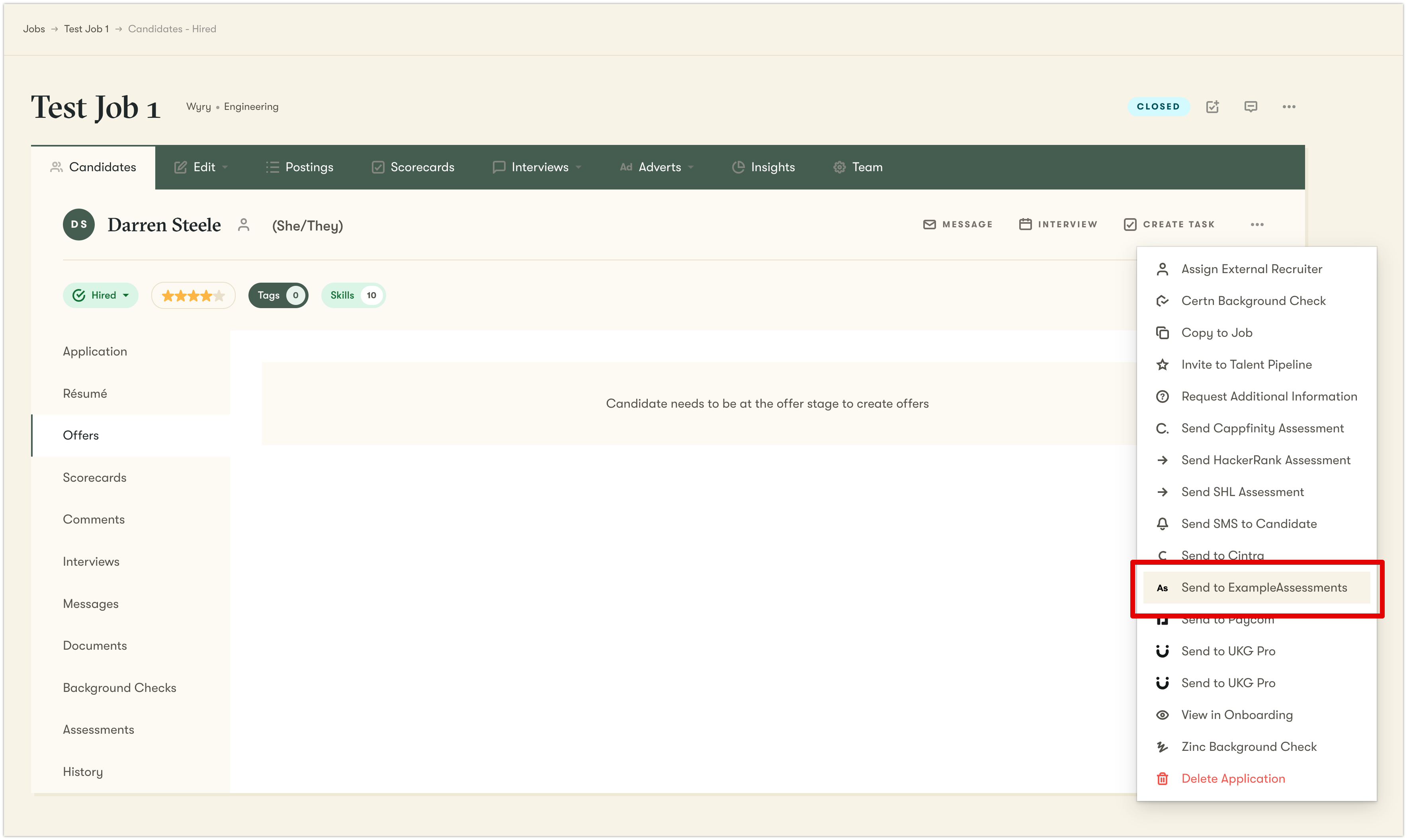
-
Pinpoint calls Action Meta Endpoint to build the form
-
User fills and submits the form
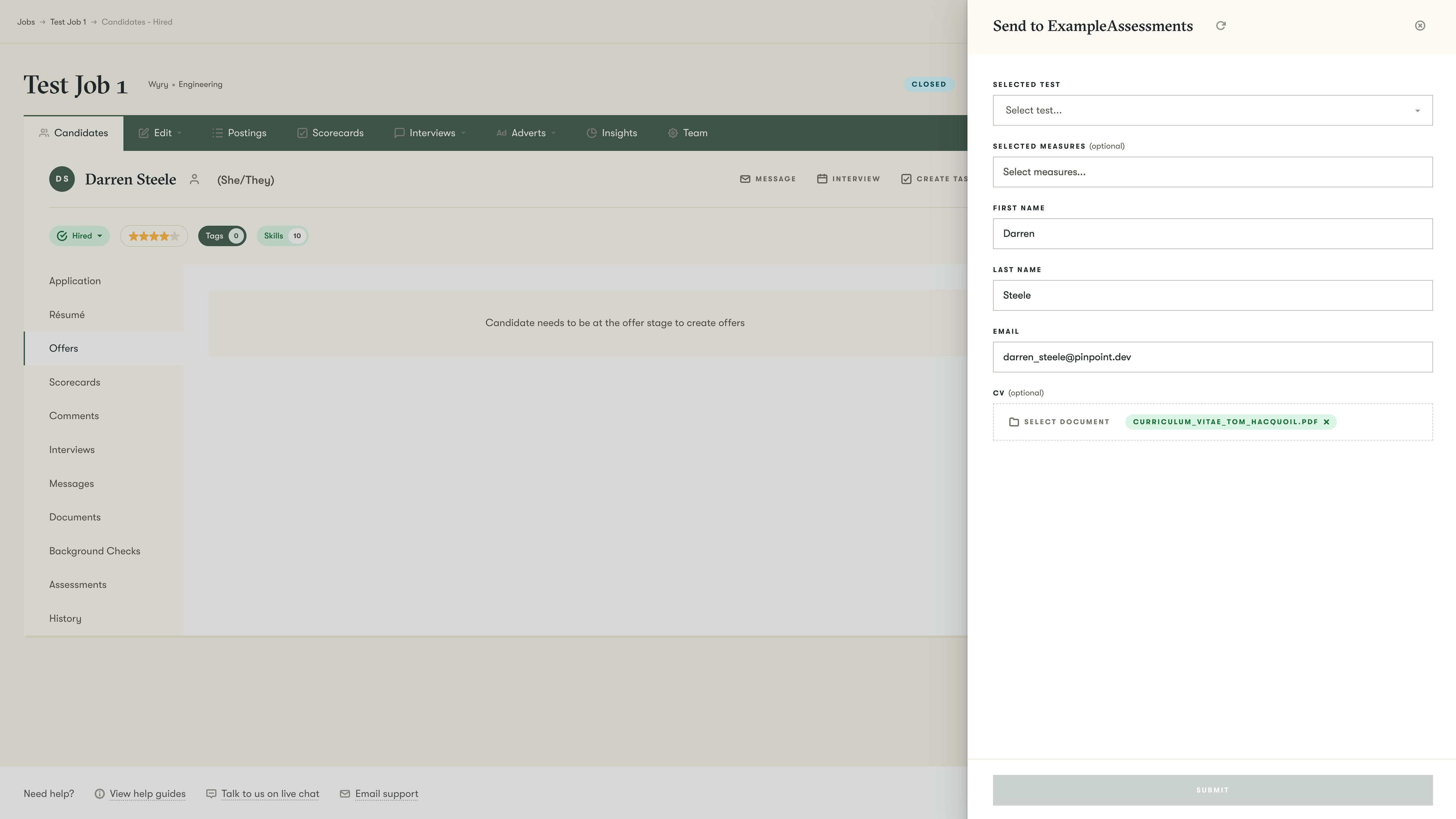
-
Platform calls Action Submit Endpoint to process
- The plugin calls the external system, passing the form field values
- External system (e.g. HRIS, HCM) processes the request
- If the export completes successfully:
- The plugin returns a successful response
- Pinpoint records the export result
- If the external system rejects the request (validation errors, 5xx):
- The plugin returns an error response
- Pinpoint shows the errors on the form and allows the user to correct and resubmit
- If the export completes successfully:
All requests Pinpoint makes to the plugin are
POSTrequests
exportCandidate Action
exportCandidate ActionPurpose
The exportCandidate action enables users to export a candidate's information to an external system at the point of hire.
Initial Set Up Endpoint (Meta Endpoint)
Endpoint: Defined by your service (e.g. /) - POST request
Called when: You initiate the setup of your plugin service. Pinpoint calls this endpoint when it registers the plugin to get the name, logo, and possible actions and configuration fields.
Responsibilities:
- Create the integration in Pinpoint
- Fetch configuration fields
- Fetch form field data mappings
Response
Example Meta Response
{
  version: '2.0.0',
  name: 'ExampleHR',
  logoBase64: 'data:image/png;base64,{base64_data}',
  actions: [
    {
      actionType: 'exportCandidate',
      key: 'exportExampleHrCandidate',
      label: 'Send to ExampleHR',
      iconSvgBase64: 'data:image/svg+xml;base64,{base64_svg}',
      metaEndpoint: '/exportCandidate/meta',
      mappings: [
        { key: 'firstName', label: 'First Name', value: '{{candidate_first_name}}' },
        { key: 'lastName', label: 'Last Name', value: '{{candidate_last_name}}' },
        { key: 'email', label: 'Email', value: '{{{candidate_email}}}' },
        { key: 'startDate', label: 'Start Date', value: '{{application_start_date}}' },
      ],
    },
  ],
  configurationFormFields: [
    {
      key: 'apiKey',
      label: 'API Key',
      description: 'Your ExampleHR API key',
      type: 'string',
      required: true,
      sensitive: true,
      useAsHttpHeader: 'X-Example-HR-Key',
      placeholder: 'For example: sk_live_abc123',
    },
  ],
}
Meta response schema
| Field | Type | Required | Validation | Description |
|---|---|---|---|---|
version | string | Yes | Must be '2.0.0' | API version of the plugin interface |
name | string | Yes | Non-empty | Display name of the integration provider |
logoBase64 | string | Yes | Non-empty | Base64-encoded logo image with data URI prefix (e.g., data:image/png;base64,{base64_png}) |
actions | array | Yes | See Action Object Schema | List of action definitions. For HRIS exports, this will be exportCandidate |
listEndpoints | array | Optional | See List Endpoint Object Schema | Endpoints that return dynamic lists of options (e.g. departments, job titles, locations) |
configurationFormFields | array | Optional | See Configuration Form Field Schema | Configuration fields for plugin setup (e.g. API Key, Base URL) |
webhookProcessEndpoint | string | Optional | Not used for exportCandidate. This action type does not support webhook processing. | |
errorEndpoint | string | Optional | Relative endpoint for error handling/reporting |
Action Object Schema
| Field | Type | Required | Validation | Description |
|---|---|---|---|---|
actionType | string(enum) | Yes | Must be exportCandidate | Defines the type of the action |
key | string | Yes | Unique action key | Must be unique across all actions (e.g. exportExampleHrCandidate) |
label | string | Yes | Non-empty | Display label for the action in UI (e.g. Send to ExampleHR) |
iconSvgBase64 | string | Yes | Non-empty | Base64-encoded SVG icon for the action. e.g. data:image/svg+xml;base64,{base64_svg} |
metaEndpoint | string | Yes | Non-empty | Relative endpoint to fetch action-specific form fields. e.g. /exportCandidate/meta |
mappings | array | Optional | See Mapping Object Schema | Default field mappings. Pinpoint pre-populates form fields using candidate data variables (e.g. {{candidate_first_name}}) |
Configuration Form Fields Schema
| Field | Type | Required | Validation | Description |
|---|---|---|---|---|
key | string | Yes | Non-empty, unique | Unique identifier for the configuration field |
label | string | Yes | Non-empty | Display label for the field |
type | string | Yes | One of: string, persisted_string | Field type |
description | string | Optional | Help text shown below the field | |
placeholder | string | Optional | Placeholder text for the input | |
required | boolean | Optional | Whether this field must be filled | |
sensitive | boolean | Optional | Whether the value is encrypted and masked. Set to true for API keys. | |
useAsHttpHeader | string | Optional | Non-empty | Send this value as an HTTP header instead of in configurationValues |
defaultValue | string | Optional | Pre-populated default value | |
readonly | boolean | Optional | Whether the field is read-only |
Mapping Object Schema
| Field | Type | Required | Description |
|---|---|---|---|
key | string | Yes | Field identifier that references a form field |
value | string | Yes | Default value or template variable (e.g. {{candidate_email}}) |
label | string | Optional | Display label for the mapping |
multiline | boolean | Optional | Whether this is a multiline text field |
List Endpoint Object Schema
| Field | Type | Required | Description |
|---|---|---|---|
key | string | Yes | Unique identifier for the list endpoint (e.g. departments) |
label | string | Yes | Display label for the list |
endpoint | string | Yes | Relative endpoint path (e.g. /exportCandidate/list/departments) |
Action Meta Endpoint
Endpoint: Defined in the meta response (at actions.[].metaEndpoint, e.g. /exportCandidate/meta) - POST request
Called when: User clicks the action button in the UI (e.g. "Send to ExampleHR")
Responsibilities:
- Validate plugin configuration
- Fetch dynamic options from the HRIS system (e.g. departments, job titles, locations)
- Build the form fields
Dynamic form refetching
The Plugin Framework supports form re-rendering based on the value selected by the user. Please find more information here
Request payload
Request Payload Example
{
  payloadVersion: "1.0.0",
  key: "exportCandidate",
  configurationValues: [
    { key: 'apiKey', value: 'sk_live_abc123' }
  ],
  formFields: [
    { key: 'department', value: 'engineering' },
    { key: 'firstName', value: 'Jane' },
  ],
}
Request Payload Schema
| Field | Type | Required | Validation | Description |
|---|---|---|---|---|
payloadVersion | string | Yes | Must be '1.0.0' | Version of the payload schema |
key | string | Yes | Must be 'exportCandidate' | Action identifier |
configurationValues | array | Optional | See Configuration Value Object | Current configuration values |
formFields | array | Optional | See Form Field Value Object | Current form field values (only present during refetch, includes fields marked with includeValueInRefetch: true) |
Response
Response Example
{
  actionVersion: '1.0.0',
  key: 'exportCandidate',
  label: 'Send to ExampleHR',
  description: 'Export this hired candidate to ExampleHR',
  formFields: [
    {
      key: 'firstName',
      label: 'First Name',
      type: 'string',
      required: true,
      readonly: false,
    },
    {
      key: 'lastName',
      label: 'Last Name',
      type: 'string',
      required: true,
      readonly: false,
    },
    {
      key: 'startDate',
      label: 'Start Date',
      type: 'date',
      required: true,
    },
    {
      key: 'department',
      label: 'Department',
      type: 'string',
      required: true,
      singleSelectOptionsListKey: 'departments',
    },
    {
      key: 'email',
      label: 'Email',
      type: 'string',
      required: true,
      readonly: false,
    },
  ],
  submitEndpoint: '/exportCandidate/submit'
}
Response Schema
| Field | Type | Required | Validation | Description |
|---|---|---|---|---|
actionVersion | string | Yes | Must be 1.0.0 | Version of the action schema |
key | string | Yes | Must be exportCandidate | Action identifier |
label | string | Yes | Non-empty | Display label for the action |
description | string | Yes | Non-empty | Description of what this action does |
formFields | array | Yes | See Form Fields Schema | Form fields to display to the user |
submitEndpoint | string | Yes | Non-empty | Relative path of the submit endpoint (e.g. /exportCandidate/submit) |
Form Fields Schema
| Field | Type | Required | Validation | Description |
|---|---|---|---|---|
key | string | Yes | Non-empty | Unique identifier for the field |
label | string | Yes | Non-empty | Display label for the field |
type | string | Yes | One of: string, callout, heading, date, divider, file, files | Type of form field to render. NOTE: Select/dropdown fields are of the string type, but require specifying singleSelectOptions, multiSelectOptions, or their ListKey variants. |
value | string | Optional | Default or pre-filled value (typically populated via field mappings) | |
placeholder | string | Optional | Placeholder text for input fields | |
description | string | Optional | Help text displayed below the field | |
required | boolean | Optional | Whether the field must be filled | |
readonly | boolean | Optional | Whether the field is read-only | |
hidden | boolean | Optional | Whether the field is hidden from view (value is still submitted) | |
multiline | boolean | Optional | Whether to render as a textarea | |
intent | string | Optional | One of: none, primary, success, warning, danger | Visual intent for callout fields |
acceptedFileTypes | array | Optional | Array of: doc, docx, gif, jpeg, jpg, pdf, png, pptx, svg, xls, xlsx | Accepted file types for file/files fields |
includeValueInRefetch | boolean | Optional | Include this field's value when refetching the form | |
performRefetchOnChange | boolean | Optional | Trigger a form refetch when this field's value changes | |
singleSelectOptions | array | Optional | See Select Option Object | Options for single-select dropdown |
singleSelectOptionsListKey | string | Optional | Reference to a listEndpoint key for dynamic options | |
multiSelectOptions | array | Optional | See Select Option Object | Options for multi-select dropdown |
multiSelectOptionsListKey | string | Optional | Reference to a listEndpoint key for dynamic multi-select options | |
checkboxOptions | array | Optional | See Select Option Object | Options for checkbox group |
radioOptions | array | Optional | Max 3 options, See Select Option Object | Options for radio button group |
Select Option Object Schema
| Field | Type | Required | Description |
|---|---|---|---|
label | string | Yes | Display text for the option |
value | string | Yes | Value to submit when this option is selected |
Action Submit Endpoint
Endpoint: Defined in meta response (via submitEndpoint, e.g. /exportCandidate/submit) - POST request
Called when: User submits the form
Responsibilities:
- Validate configuration and field values
- Create or update the employee record in the external HRIS system
- Return a success or error response
Payload
The platform sends the form field values and configuration values. Unlike assessments and background checks, there is no webhookUrl or generatedUuid — this action does not use webhooks.
Example payload
{
  payloadVersion: '1.0.0',
  key: 'exportCandidate',
  formFields: [
    { key: 'firstName', value: 'Jane' },
    { key: 'lastName', value: 'Smith' },
    { key: 'email', value: '[email protected]' },
    { key: 'startDate', value: '2024-03-01' },
    { key: 'department', value: 'engineering' },
  ],
  configurationValues: [
    { key: 'apiKey', value: 'sk_live_abc123' },
  ],
}
Request Payload Schema
| Field | Type | Required | Validation | Description |
|---|---|---|---|---|
payloadVersion | string | Yes | Must be '1.0.0' | Version of the payload schema |
key | string | Yes | Must be 'exportCandidate' | Action identifier |
formFields | array | Yes | See Form Field Value Object | User-submitted form field values |
configurationValues | array | Optional | See Configuration Value Object | Current configuration values from plugin setup |
Form Field Value Object
| Field | Type | Required | Description |
|---|---|---|---|
key | string | Yes | Field identifier (matches the key from formFields in meta response) |
value | string | Optional | User-submitted value |
Configuration Value Object
| Field | Type | Required | Description |
|---|---|---|---|
key | string | Yes | Configuration field key (from configurationFormFields) |
value | string | Yes | Configuration value (nullable) |
Response
Successful Response
Returned when the export completes successfully.
{
  resultVersion: '2.0.0',
  key: 'exportCandidate',
  success: true,
  externalIdentifier: 'emp_789',       # ID of the employee record in the HRIS
  externalSystem: 'personio',          # identifies the HRIS system
  message: {
    title: 'Export successful',
    text: 'Jane Smith has been exported to ExampleHR.',
    status: 'success'
  }
}
Error Response
{
  resultVersion: '2.0.0',
  key: 'exportCandidate',
  success: false,
  toast: {
    error: 'Failed to export candidate to ExampleHR'
  },
  errors: [
    { key: 'department', error: 'Department not found in ExampleHR' },
    { key: 'startDate', error: 'Start date must be in the future' }
  ]
}
Response Schema
Success Response
| Field | Type | Required | Validation | Description |
|---|---|---|---|---|
resultVersion | string | Yes | Must be '2.0.0' | Version of the result schema |
key | string | Yes | Must be 'exportCandidate' | Action identifier |
success | boolean | Yes | Must be true | Indicates successful export |
externalIdentifier | string | Optional | Non-empty | ID of the created record in the external system (e.g. employee ID) |
externalSystem | string | Optional | See External System Values | Identifies the HRIS system — used by Pinpoint to tag the export record |
message | object | Optional | See Message Object Schema | Success or informational message displayed to the user |
toast | object | Optional | See Toast Object Schema | Toast notifications to display in the UI |
persist | array | Optional | See Persist Object Schema | Configuration values to persist for future use |
Error Response
| Field | Type | Required | Validation | Description |
|---|---|---|---|---|
success | boolean | Yes | Must be false | Indicates failure |
toast | object | Optional | See Toast Object Schema | Toast notifications to display |
errors | array | Optional | See Field Error Object Schema | Field-specific validation errors |
Message Object Schema
| Field | Type | Required | Description |
|---|---|---|---|
text | string | Yes | Message body text |
title | string | Optional | Message title |
status | string | Optional | One of: success, error — controls the visual styling |
Toast Object Schema
| Field | Type | Required | Description |
|---|---|---|---|
error | string | Optional | Error message to display |
warning | string | Optional | Warning message to display |
info | string | Optional | Informational message to display |
success | string | Optional | Success message to display |
Field Error Object Schema
| Field | Type | Required | Description |
|---|---|---|---|
key | string | Yes | Field identifier that has the error |
error | string | Yes | Error message for the field |
Persist Object Schema
| Field | Type | Required | Description |
|---|---|---|---|
key | string | Yes | Configuration field key to update |
value | string | Yes | New value to persist (will be available in configurationValues on future requests) |
External System Values
The externalSystem field identifies which HRIS the candidate was exported to. Accepted values:
other, intelli_hr, people_hr, rippling, oracle, cezanne, adonis_hr, humaans, itrent, bob, deel, compas, bizimply, workday, planday, natural_hr, personio, paycom, ukg_pro, gusto, ukg_ready, adp_workforce_now, fourth_onboarding, adonis, lattice, dayforce, paylocity, smartsheet, sap_successfactors
Use other if your system is not listed.
Complete Integration Flow Example
Note: This is a simplified example of the complete flow (payloads are not complete).
1. User Exports Candidate to HRIS
Platform → Plugin (Action Meta Endpoint)
POST /exportCandidate/metaPlugin → Platform
{
  formFields: [
    { key: 'firstName', type: 'string', value: 'Jane' },
    { key: 'lastName', type: 'string', value: 'Smith' },
    { key: 'department', type: 'string', singleSelectOptionsListKey: 'departments' },
    { key: 'startDate', type: 'date' }
  ],
  submitEndpoint: '/exportCandidate/submit'
}
2. User Submits Form
Platform → Plugin (Submit Endpoint)
POST /exportCandidate/submit
{
  payloadVersion: '1.0.0',
  key: 'exportCandidate',
  formFields: [
    { key: 'firstName', value: 'Jane' },
    { key: 'lastName', value: 'Smith' },
    { key: 'department', value: 'engineering' },
    { key: 'startDate', value: '2024-03-01' }
  ],
  configurationValues: [
    { key: 'apiKey', value: 'sk_live_abc123' }
  ]
}
3. Plugin Returns Success
Plugin → Platform
{
  resultVersion: '2.0.0',
  key: 'exportCandidate',
  success: true,
  externalIdentifier: 'emp_789',
  externalSystem: 'personio',
  message: {
    title: 'Export successful',
    text: 'Jane Smith has been created in ExampleHR.',
    status: 'success'
  }
}
Schemas
Action Meta Schema
This schema validates the response from your Action Meta Endpoint.
{
  "$schema": "http://json-schema.org/draft-06/schema#",
  "type": "object",
  "properties": {
    "actionVersion": { "enum": ["1.0.0"], "type": "string" },
    "key": { "enum": ["exportCandidate"], "type": "string" },
    "label": { "type": "string", "minLength": 1 },
    "description": { "type": "string", "minLength": 1 },
    "formFields": {
      "type": "array",
      "items": {
        "type": "object",
        "properties": {
          "key": { "type": "string", "minLength": 1 },
          "label": { "type": "string", "minLength": 1 },
          "type": { "enum": ["string", "callout", "heading", "date", "divider", "file", "files"] },
          "value": { "type": "string" },
          "placeholder": { "type": "string" },
          "description": { "type": "string" },
          "multiline": { "type": "boolean" },
          "required": { "type": "boolean" },
          "readonly": { "type": "boolean" },
          "hidden": { "type": "boolean" },
          "intent": { "enum": ["none", "primary", "success", "warning", "danger"] },
          "acceptedFileTypes": { "type": "array", "items": { "enum": ["doc","docx","gif","jpeg","jpg","pdf","png","pptx","svg","xls","xlsx"] } },
          "includeValueInRefetch": { "type": "boolean" },
          "performRefetchOnChange": { "type": "boolean" },
          "singleSelectOptions": { "type": "array", "items": { "type": "object", "properties": { "label": { "type": "string", "minLength": 1 }, "value": { "type": "string", "minLength": 1 } }, "required": ["label", "value"] } },
          "singleSelectOptionsListKey": { "type": "string" },
          "multiSelectOptions": { "type": "array", "items": { "type": "object", "properties": { "label": { "type": "string", "minLength": 1 }, "value": { "type": "string", "minLength": 1 } }, "required": ["label", "value"] } },
          "multiSelectOptionsListKey": { "type": "string" },
          "checkboxOptions": { "type": "array", "items": { "type": "object", "properties": { "label": { "type": "string", "minLength": 1 }, "value": { "type": "string", "minLength": 1 } }, "required": ["label", "value"] } },
          "radioOptions": { "type": "array", "maxLength": 3, "items": { "type": "object", "properties": { "label": { "type": "string", "minLength": 1 }, "value": { "type": "string", "minLength": 1 } }, "required": ["label", "value"] } }
        },
        "required": ["key", "label", "type"]
      }
    },
    "submitEndpoint": { "type": "string", "minLength": 1 }
  },
  "required": ["actionVersion", "key", "label", "description", "formFields", "submitEndpoint"]
}
Action Payload Schema
This schema validates the request sent to your Action Submit Endpoint.
{
  "$schema": "http://json-schema.org/draft-06/schema#",
  "type": "object",
  "properties": {
    "payloadVersion": { "enum": ["1.0.0"], "type": "string" },
    "key": { "enum": ["exportCandidate"], "type": "string" },
    "formFields": {
      "type": "array",
      "items": {
        "type": "object",
        "properties": {
          "key": { "type": "string", "minLength": 1 },
          "value": { "type": "string" }
        },
        "required": ["key"]
      }
    },
    "configurationValues": {
      "type": "array",
      "items": {
        "type": "object",
        "properties": {
          "key": { "type": "string", "minLength": 1 },
          "value": { "type": ["null", "string"] }
        },
        "required": ["key", "value"]
      }
    }
  },
  "required": ["payloadVersion", "key", "formFields"]
}
Action Result Schema
This schema validates the response from your Action Submit Endpoint.
{
  "$schema": "http://json-schema.org/draft-06/schema#",
  "type": "object",
  "properties": {
    "resultVersion": { "enum": ["2.0.0"], "type": "string" },
    "key": { "enum": ["exportCandidate"], "type": "string" },
    "success": { "type": "boolean" },
    "externalIdentifier": { "type": "string", "minLength": 1 },
    "externalSystem": {
      "enum": ["other","intelli_hr","people_hr","rippling","oracle","cezanne","adonis_hr","humaans","itrent","bob","deel","compas","bizimply","workday","planday","natural_hr","personio","paycom","ukg_pro","gusto","ukg_ready","adp_workforce_now","fourth_onboarding","adonis","lattice","dayforce","paylocity","smartsheet","sap_successfactors"],
      "type": "string"
    },
    "message": {
      "type": "object",
      "properties": {
        "text": { "type": "string", "minLength": 1 },
        "title": { "type": "string", "minLength": 1 },
        "status": { "enum": ["success", "error"], "type": "string" }
      },
      "required": ["text"]
    },
    "toast": {
      "type": "object",
      "properties": {
        "error": { "type": "string", "minLength": 1 },
        "warning": { "type": "string", "minLength": 1 },
        "info": { "type": "string", "minLength": 1 },
        "success": { "type": "string", "minLength": 1 }
      }
    },
    "persist": {
      "type": "array",
      "items": {
        "type": "object",
        "properties": {
          "key": { "type": "string", "minLength": 1 },
          "value": { "type": "string", "minLength": 1 }
        },
        "required": ["key", "value"]
      }
    }
  },
  "required": ["resultVersion", "key", "success"]
}
Updated 6 months ago